The product codes “00123” and “123” can identify two different items even though both become the number 123. A column full of digits is not necessarily a column of quantities.
When a report silently turns an identifier into a number, it can lose part of the label. The row count and grand total may still look right, making the mistake surprisingly easy to overlook.
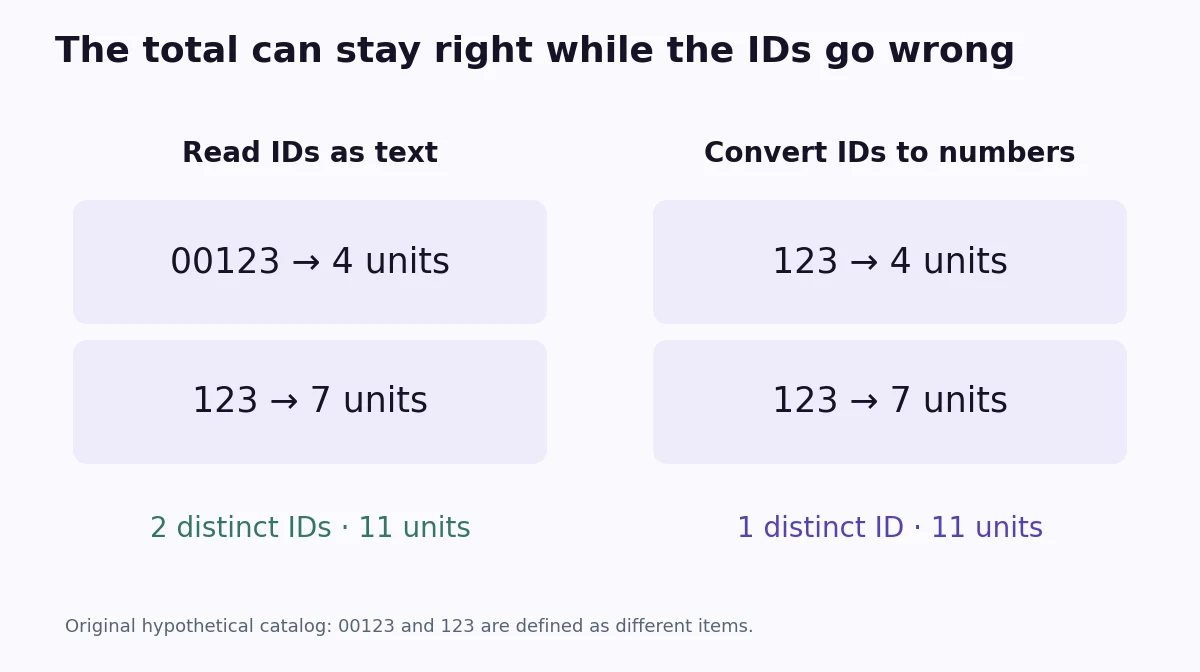
A correct total can hide the wrong identities
Consider this original hypothetical stock list. The catalog deliberately uses two separate item codes:
| Item ID | Stock |
|---|---|
| 00123 | 4 |
| 123 | 7 |
The list has two items and 11 units in stock. Now imagine an import converting both IDs to the integer 123. The table still contains two rows and 11 units. But grouping by the imported ID produces one group instead of two.
Nothing has gone wrong with the addition \(4+7=11\). The problem is that a change to the key has changed which records appear to belong together.
The column’s meaning decides its type
A quantity describes an amount that can meaningfully be added, subtracted, or averaged in context. An identifier points to something. Adding two product IDs does not produce a useful new product ID.
Digit-only identifiers often look numerical because their designers used a compact alphabet of ten characters. That does not make leading characters disposable. An import needs the catalog’s rules, rather than a guess based only on appearance.
Some systems explicitly define a code as a number displayed with padding. In that system, the two forms may represent the same key. Other systems treat every character as significant, as our hypothetical catalog does. Preserve the original text while checking the specification.
Decide before the import discards information
The following pandas example reads the same inline CSV twice. The first read allows type inference. The second explicitly reads item_id as text:
from io import StringIO
import pandas as pd

csv_text = "item_id,stock\n00123,4\n123,7\n"

inferred = pd.read_csv(StringIO(csv_text))
preserved = pd.read_csv(StringIO(csv_text), dtype={"item_id": "string"})

print(inferred.to_string(index=False))
print(preserved.to_string(index=False))
print("Inferred distinct IDs:", inferred["item_id"].nunique())
print("Preserved distinct IDs:", preserved["item_id"].nunique())
With pandas 2.3.3, the inferred IDs are 123 and 123, yielding one distinct value. The explicit string column keeps 00123 and 123, yielding two. Both stock columns still sum to 11.
Changing the inferred column to text afterward produces “123” twice. That cannot reveal whether either source value originally had two, three, or no leading zeros. Padding every value to five characters is also a new assumption: in this catalog it would collapse two valid codes into “00123.”
Check missing-value rules, too
A text type does not turn off a parser’s missing-value rules. If “NA” is a legitimate item code, for example, those rules need an explicit decision as well. In a file where all code strings must be retained exactly, this read preserves the literal code “NA”:
codes = pd.read_csv(
    StringIO("item_id,stock\nNA,2\n00123,4\n"),
    dtype={"item_id": "string"},
    keep_default_na=False,
)
That setting also changes how empty fields are read, so validate empty or invalid IDs under the actual data specification. Keep identifier handling separate from the numeric stock column.
Validate the keys as well as the totals
When testing an import, compare several known IDs with the source, including examples with leading zeros. Check distinct-key counts when the expected number is known, and investigate unmatched or unexpectedly merged records. A matching grand total alone does not establish that every unit is assigned to the right item.
If a cleaned key is needed, keep the raw ID and create a separate normalized column using documented rules. That makes the transformation reviewable and gives you a way back to the original record.
The same check belongs at the start of a workflow that combines several CSV exports. Once an early import has erased part of a code, a later merge cannot reliably reconstruct it.