Use pandas.concat to stack rows from CSV files that describe the same kind of records. Before combining them, check their columns and data types so a changed export does not quietly create missing values or damage identifiers.
This tutorial uses two tiny, invented order exports. All example data and Python code are included below; no download is required. The examples were executed with Python 3.11.3 and pandas 2.3.3 on Windows.
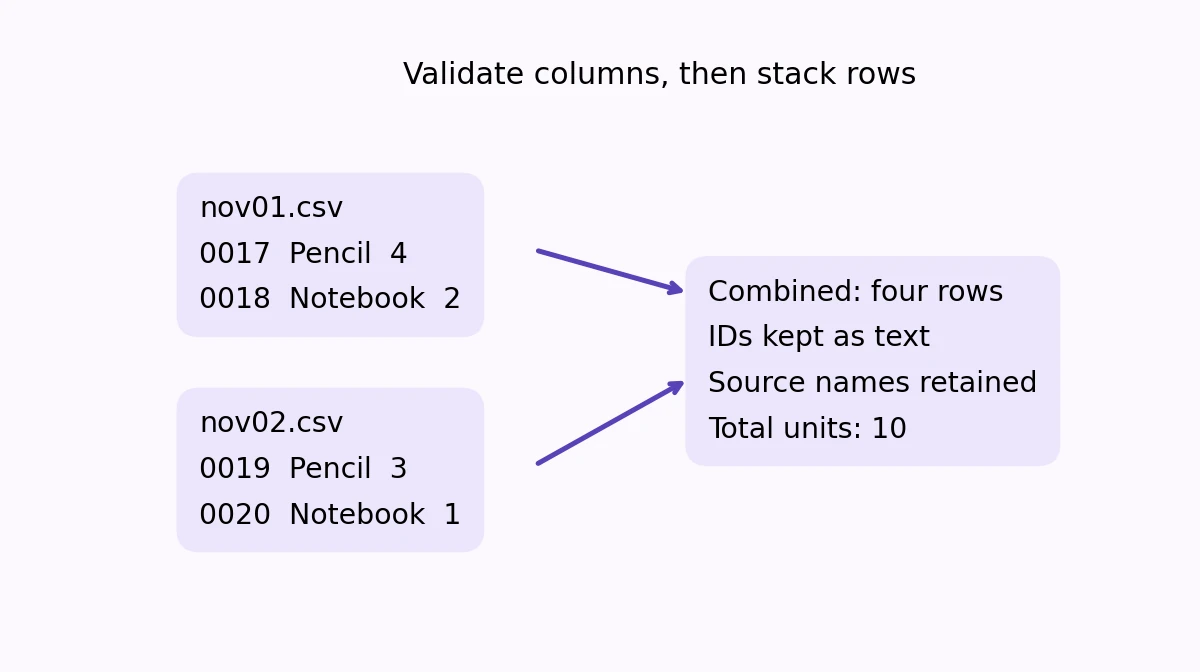
What we are combining
Each export has the columns order_id,item,units. The first contains orders 0017 and 0018 with four pencils and two notebooks. The second contains orders 0019 and 0020 with three pencils and one notebook. Leading zeros belong to the identifiers and must survive the import.
These are comma-separated, UTF-8 inputs with whole-number units. This is a vertical stack: four rows with the same columns. Matching two different tables by a shared key is a join or merge, a different operation.
Run the complete example
Install pandas in your chosen Python environment if needed; the tested version was python -m pip install pandas==2.3.3. Then run this self-contained example. StringIO lets the included CSV text act as a file without saving example files.
from io import StringIO
import pandas as pd

EXPECTED = ["order_id", "item", "units"]

def load_one(source, name):
    frame = pd.read_csv(
        source,
        dtype={"order_id": "string", "item": "string", "units": "Int64"},
        keep_default_na=False,
    )
    if list(frame.columns) != EXPECTED:
        raise ValueError(f"{name}: expected columns {EXPECTED}")
    if frame.empty:
        raise ValueError(f"{name}: no data rows")
    if frame["order_id"].str.strip().eq("").any():
        raise ValueError(f"{name}: blank order ID")
    if frame["item"].str.strip().eq("").any():
        raise ValueError(f"{name}: blank item")
    if frame["units"].isna().any() or frame["units"].lt(0).any():
        raise ValueError(f"{name}: units must be nonnegative whole numbers")
    return frame.assign(source_file=name)

samples = {
    "nov01.csv": "order_id,item,units\n0017,Pencil,4\n0018,Notebook,2\n",
    "nov02.csv": "order_id,item,units\n0019,Pencil,3\n0020,Notebook,1\n",
}
frames = [load_one(StringIO(text), name) for name, text in sorted(samples.items())]
combined = pd.concat(frames, ignore_index=True)
print(combined.to_string(index=False))
print("Total units:", combined["units"].sum())
The loader requires the exact column names and order, nonblank IDs and item labels, and nonnegative whole-number units. An incompatible export stops with an error instead of being silently included. The function adds the source name to every row for traceability.
Check the result
| order_id | item | units | source_file |
|---|---|---|---|
| 0017 | Pencil | 4 | nov01.csv |
| 0018 | Notebook | 2 | nov01.csv |
| 0019 | Pencil | 3 | nov02.csv |
| 0020 | Notebook | 1 | nov02.csv |
The result has four rows and 10 total units. The IDs remain text, including their leading zeros. ignore_index=True creates a fresh row index; it does not remove duplicated records or change an order identifier.
Read your own folder
Keep load_one and the pandas import from the first example, then add this function. It reads CSV files immediately inside the supplied folder in sorted filename order. It does not search subfolders or write an output file.
from pathlib import Path

def combine_folder(folder):
    paths = sorted(Path(folder).glob("*.csv"))
    if not paths:
        raise ValueError("No CSV files found in the input folder")
    frames = [load_one(path, path.name) for path in paths]
    return pd.concat(frames, ignore_index=True)

# Run after load_one and the pandas import above have been defined:
# combined = combine_folder("raw_csv")
# print(combined.to_string(index=False))
Use a folder containing only the raw exports you intend to combine. The exact schema check is deliberate: if an export changes, inspect it rather than allowing pandas’ default outer concatenation to fill mismatched columns with missing values.
Decide what a duplicate means
Concatenation preserves repeated rows. Two identical records may be a duplicated export, but a repeated order ID might also represent separate line items. Choose a business rule before dropping anything; this example removes no observations.
For other datasets, adjust the expected columns and types together. Treat postal codes and account identifiers as text when leading zeros matter. Parse dates with an explicit format when their meaning could be ambiguous. The goal is a validated table, not simply a larger one.