A category with no records can still belong in a summary. If a ticket report always uses Open, Pending, and Resolved, a day with no pending tickets should show Pending with a count of zero.
Define the allowed categories before grouping, then pass observed=False explicitly. This example counts three original hypothetical records and returns Open: 1, Pending: 0, and Resolved: 2.
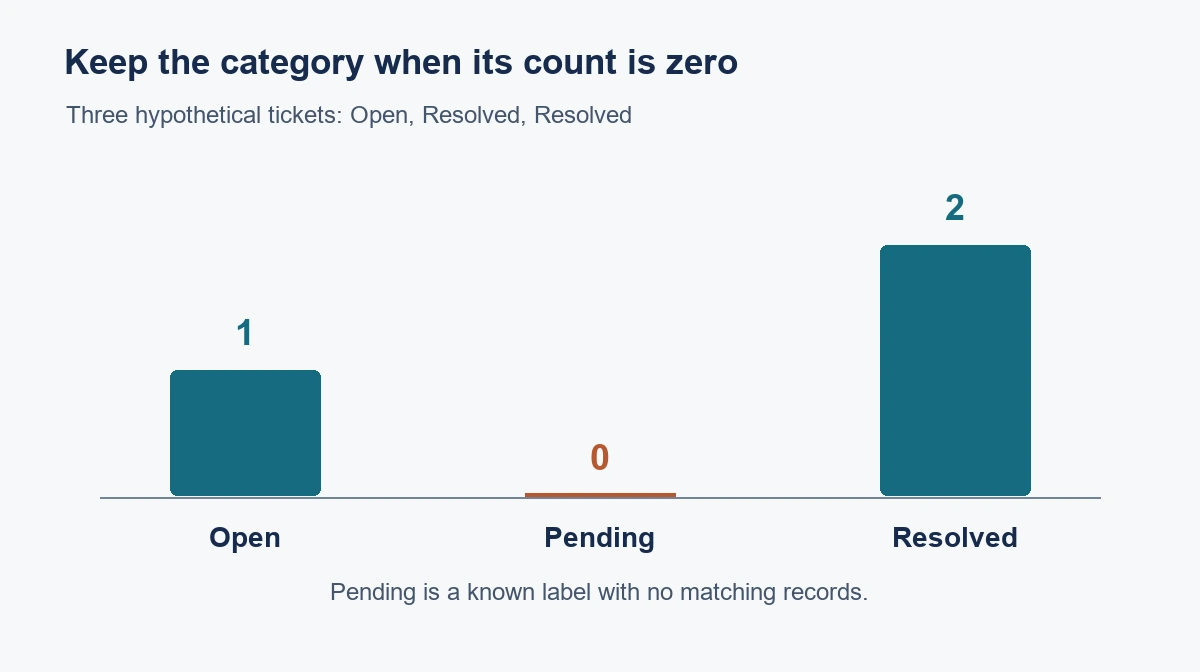
Start with the records and the reporting categories
Each input row represents one ticket. The list of categories comes from the reporting rule, so it includes Pending even though that label does not appear in today’s records.
| ticket_id | status |
|---|---|
| T01 | Open |
| T02 | Resolved |
| T03 | Resolved |
The complete example below was executed with Python 3.11.3 and pandas 2.3.3. Current pandas documentation was also reviewed. The code states the observed option because its default changed to True in pandas 3.0.
Validate the labels, then count every category
Check the original labels before converting them. Constructing a categorical with an explicit category list turns an unrecognized value into a missing value. Without a check, a typo such as Pendng could disappear from the grouped count.
import pandas as pd

LEVELS = ["Open", "Pending", "Resolved"]


def count_statuses(source):
    labels = source["status"]
    if labels.isna().any():
        raise ValueError("Resolve missing status labels before counting.")
    unexpected = labels[~labels.isin(LEVELS)].unique().tolist()
    if unexpected:
        raise ValueError(f"Unrecognized status labels: {unexpected}")

    tickets = source.copy()
    tickets["status"] = pd.Categorical(labels, categories=LEVELS)
    return (
        tickets.groupby("status", observed=False, sort=True)
        .size()
        .rename("ticket_count")
        .reset_index()
    )


source = pd.DataFrame({
    "ticket_id": ["T01", "T02", "T03"],
    "status": ["Open", "Resolved", "Resolved"],
})
summary = count_statuses(source)
print(summary.to_string(index=False))
The result retains all three labels in the order defined by LEVELS:
  status  ticket_count
    Open             1
 Pending             0
Resolved             2
pd.Categorical records the allowed labels. With a categorical grouping column, observed=False includes its unused categories. size() counts rows in each group, giving Pending zero rows. This example counts records; repeated ticket rows would also be counted, so resolve duplicates if your input can contain them.
Keep an absent category separate from an unknown label
Pending is a known category with no matching rows in this dataset. A missing status is an incomplete record, and Pendng is an unrecognized label. The function rejects those two problems rather than treating them as evidence of zero tickets.
To see the validation, run either example separately:
count_statuses(pd.DataFrame({"status": ["Open", "Pendng"]}))
# ValueError: Unrecognized status labels: ['Pendng']
count_statuses(pd.DataFrame({"status": ["Open", None]}))
# ValueError: Resolve missing status labels before counting.The matching is exact: open and Open differ. If your source needs case or whitespace cleanup, apply a stated cleanup rule before this validation and retain the original values when you need an audit trail.
Use reindex when you already have a count Series
If the source labels have already passed the same checks, you can count the plain text labels and add absent reporting categories afterward:
counts = source.groupby("status").size()
complete_counts = counts.reindex(LEVELS, fill_value=0)
complete_counts.index.name = "status"
print(complete_counts.rename("ticket_count").reset_index().to_string(index=False))
This produces the same three counts. reindex selects the requested labels and fills newly introduced positions with zero. Validate first: an unexpected label outside LEVELS would otherwise be left out of the result.
An empty input with the required status column returns zero for all three categories. Those zeros describe the rows supplied to the function. If an empty input means an import failed or a reporting period is incomplete, investigate that failure before presenting the counts as a complete report.
For a numeric column that needs categories before summarizing, see how to group package weights into bands with pandas.cut. Choose the permitted categories or intervals from the reporting question, then check which ones have observations.
Further reading
- pandas documentationpandas.CategoricalDefine allowed categories and understand what happens to values outside the list.
- pandas documentationDataFrame.groupbyRead the observed and sort options used in the category summary.
- pandas documentationSeries.reindexAlign an existing count Series to a complete reporting list.