Sort the rows by the value you care about, then use groupby().head(n) to take the first rows in each group. A second sort key decides which row goes first when values tie. To keep every row tied at the cutoff, rank the values within each group and filter by rank.
Suppose you need the three largest shipments on each delivery route. One route has a tie at the cutoff, another has a missing package count, and a third has only two shipments. This small example lets you see how both methods handle those cases.
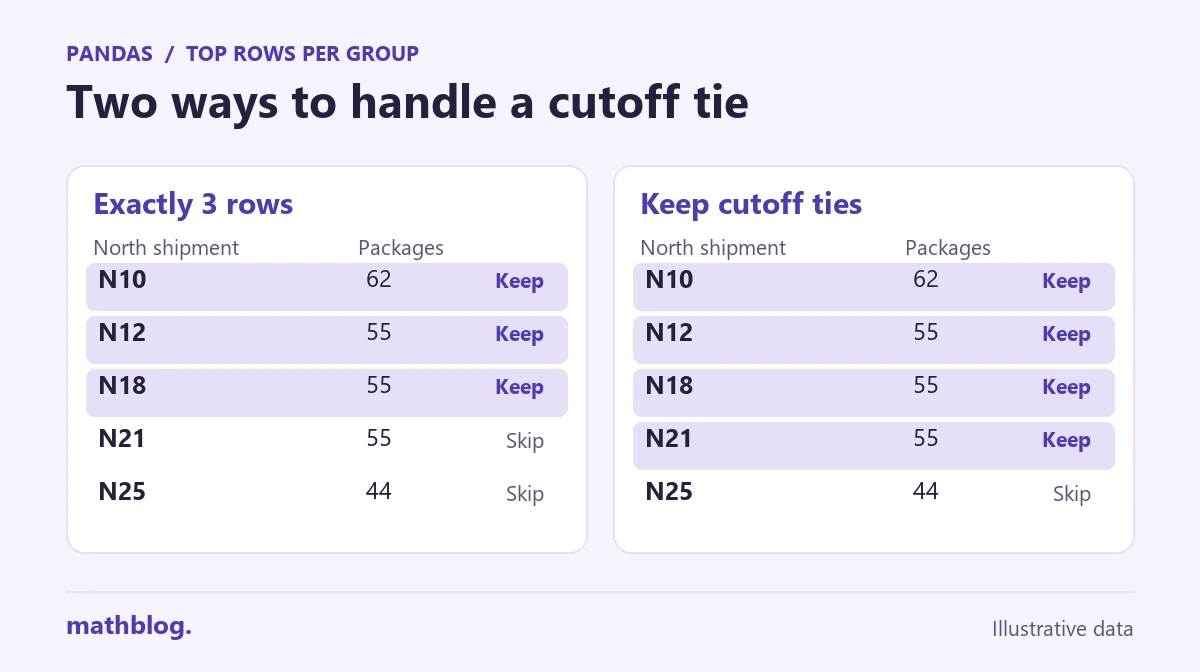
1. Load the example and decide what qualifies
The rows below are in input order. Shipment IDs are unique, and the package count for S11 is unknown.
| Route | Shipment | Packages |
|---|---|---|
| North | N21 | 55 |
| South | S09 | 42 |
| West | W07 | 45 |
| North | N18 | 55 |
| South | S11 | Unknown |
| North | N10 | 62 |
| South | S05 | 68 |
| North | N25 | 44 |
| West | W02 | 75 |
| South | S03 | 70 |
| North | N12 | 55 |
| South | S06 | 50 |
Run the code blocks in order in the same Python session. This example was tested with pandas 2.3.3 on Python 3.11.3.
from io import StringIO

import pandas as pd

csv_data = """route,shipment,packages
North,N21,55
South,S09,42
West,W07,45
North,N18,55
South,S11,
North,N10,62
South,S05,68
North,N25,44
West,W02,75
South,S03,70
North,N12,55
South,S06,50
"""

shipments = pd.read_csv(StringIO(csv_data), dtype={"packages": "Int64"})
eligible = shipments.dropna(subset=["route", "packages"])
limit = 3
Int64 lets the package column hold whole numbers and a missing value. This report ranks shipments with a known route and package count, so dropna keeps S11 out of the selection. The original shipments table still has all 12 rows. If missing counts are common, inspect the missing values before choosing how to report them.
2. Keep up to three rows on each route
Sort the route names in ascending order, the package counts in descending order, and equal package counts by shipment ID in ascending order. The three Boolean values in ascending correspond to those three columns.
ordered = eligible.sort_values(
    ["route", "packages", "shipment"],
    ascending=[True, False, True],
)
limited = ordered.groupby("route", sort=False).head(limit)

print(limited.to_string(index=False))
route shipment packages
North N10 62
North N12 55
North N18 55
South S03 70
South S05 68
South S06 50
West W02 75
West W07 45head(limit) takes rows in their current order inside each route, so the sort comes first. The ID order puts N12 and N18 ahead of N21. West contributes both available rows. Choose a secondary sort key that matches your rule, such as an earlier recorded shipment time, and use a unique final key when the selected rows must be reproducible.
3. Include every row tied at the cutoff
If all shipments tied at the cutoff should appear, rank by package count alone within each route. With method="min", tied rows receive the earliest position in their tie group. ascending=False gives the largest shipment rank 1.
ranks = ordered.groupby("route", sort=False)["packages"].rank(
    method="min", ascending=False
)
with_ties = ordered.loc[ranks.le(limit)]

print(with_ties.to_string(index=False))
route shipment packages
North N10 62
North N12 55
North N18 55
North N21 55
South S03 70
South S05 68
South S06 50
West W02 75
West W07 45North’s ranks are 1, 2, 2, 2, and 5. All three shipments with 55 packages reach the cutoff, so North contributes four rows. Dense ranking would give the 44 package shipment rank 3. Use dense ranking when you want the top three distinct package counts.
Check how many rows you kept
The first result contains eight rows, and the second contains nine. This check shows which route changed between the two versions.
counts = pd.DataFrame({
    "limited": limited.groupby("route").size(),
    "with_ties": with_ties.groupby("route").size(),
})
print(counts.reset_index().to_string(index=False))
route limited with_ties
North 3 4
South 3 3
West 2 2Use the limited result when a report has room for at most three rows per route. Use the rank filter when your rule gives all equal counts at the boundary the same treatment. In either case, a group with fewer eligible rows contributes only the rows it has.