Find missing values in pandas with isna(), then fill only the columns where a replacement has a clear meaning. An unassigned owner can reasonably receive a display label. An unknown duration usually should not become zero just because a report looks tidier that way.
We will inspect five hypothetical support tickets, recognize blank text, and preserve the original data. The example also keeps track of which numbers were missing before demonstrating an optional estimate. That distinction matters when someone later reads a filled table as if every value had been observed.
Count the missing values first
Run the blocks in order with pandas installed. Everything is included inline; you do not need to download a dataset. The explicit string and Int64 dtypes support missing values while retaining text and nullable whole numbers.
import pandas as pd

df = pd.DataFrame({
    "ticket_id": [101, 102, 103, 104, 105],
    "owner": pd.Series(["Ava", None, "", "  ", "NA"], dtype="string"),
    "minutes": pd.Series([12, None, 0, 18, None], dtype="Int64"),
})
print(df.isna().sum().to_string())
Expected missing-value counts:
ticket_id    0
owner        1
minutes      2
Only one owner is missing according to the initial data: the value supplied as None. An empty string and a string containing spaces are still strings. The literal text "NA" is also a string here, and the zero in the minutes column is a valid number.
These results describe a DataFrame constructed directly from Python values. Import readers can apply their own missing-value rules. For example, a CSV reader may interpret certain text markers as missing. Check the import settings if a meaningful label disappears before your cleaning code runs.
Recognize blank text deliberately
In this ticket system, a blank or whitespace-only owner means that nobody has been assigned. We can encode that specific rule without replacing other text values throughout the entire table.
clean = df.copy()
clean["owner"] = clean["owner"].str.strip().replace("", pd.NA)
print(clean.isna().sum().to_string())
print(clean.loc[clean["minutes"].isna(), ["ticket_id", "owner"]].to_string(index=False))
Expected result:
ticket_id    0
owner        3
minutes      2
 ticket_id owner
       102  <NA>
       105    NA
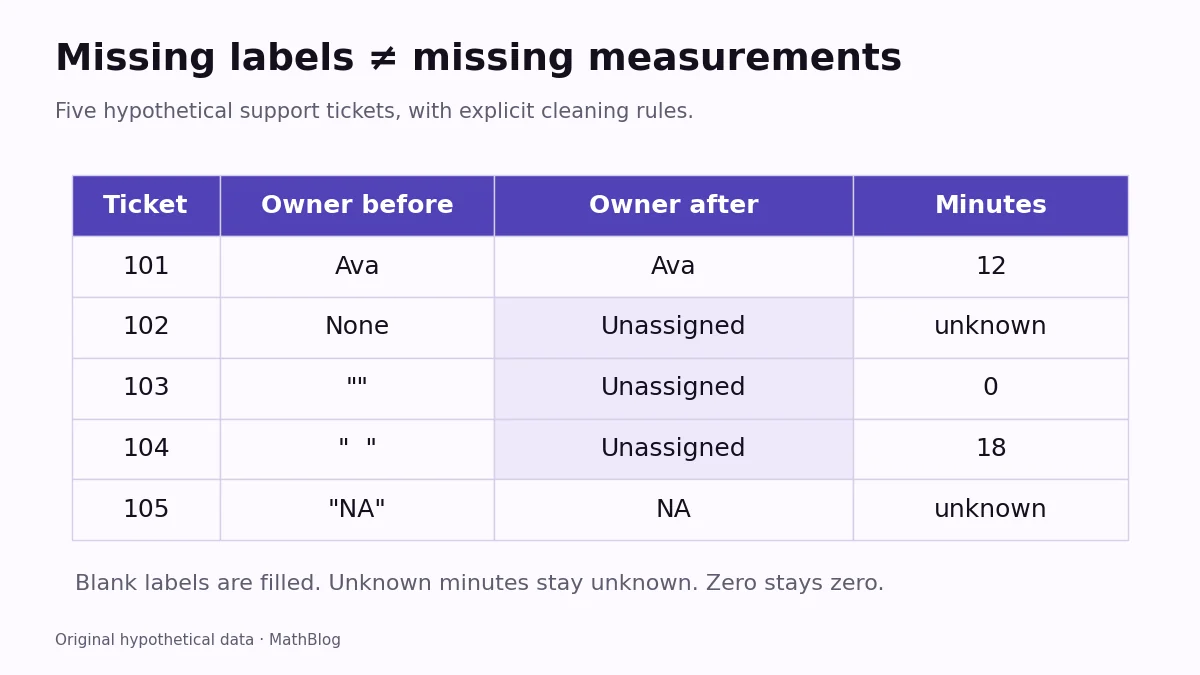
After trimming, both blank strings become empty strings and are replaced by pandas’ missing marker. There are now three missing owners. Tickets 102 and 105 still have unknown durations. The text "NA" remains intact because we have not declared it a missing-value code.
Do not test for missing data with comparisons such as value == pd.NA. Missing markers have special comparison behavior. Use isna() for missing values and notna() for present values.
Fill a label while preserving unknown numbers
Add flags before filling anything. These columns retain the distinction between original and substituted values. We will fill the owner label, but leave missing minutes alone in the cleaned working table.
clean["owner_missing"] = clean["owner"].isna()
clean["minutes_missing"] = clean["minutes"].isna()
clean["owner"] = clean["owner"].fillna("Unassigned")
print(clean[["ticket_id", "owner", "minutes"]].to_string(index=False))
Expected result:
 ticket_id      owner  minutes
       101        Ava       12
       102 Unassigned     <NA>
       103 Unassigned        0
       104 Unassigned       18
       105         NA     <NA>
The <NA> entries are still unknown. They do not mean the tickets took no time. Notice that ticket 103 retains its genuine zero-minute value. Assigning the result back to the full column also avoids relying on a chained, in-place operation.
If you estimate a number, label it as an estimate
Sometimes a separate analysis explicitly requires imputation. The following optional example fills unknown durations with the median of the three observed durations: 0, 12, and 18 minutes. Their median is 12. This is a demonstration of a stated assumption, not evidence that either missing duration really was 12 minutes.
estimated = clean.copy()
known_median = estimated["minutes"].median()
estimated["minutes"] = estimated["minutes"].astype("Float64").fillna(known_median)
print(estimated[["ticket_id", "minutes", "minutes_missing"]].to_string(index=False))
Expected estimated table:
 ticket_id  minutes  minutes_missing
       101     12.0            False
       102     12.0             True
       103      0.0            False
       104     18.0            False
       105     12.0             True
The original missing flags survive, and clean still retains the unknown durations. Converting the estimated column to nullable Float64 also allows a fractional median in a different dataset. An integer column cannot always hold a suitable replacement.
Choose a rule before filling a whole table
A label, an identifier, a measured quantity, and a date can require four different decisions. Avoid a blanket df.fillna(0) unless zero has a defensible meaning in every affected column. Filling with a median can change a distribution; carrying a previous value forward can imply that a condition persisted.
Count missing values before and after each step, keep a copy of the raw input, and document every replacement. These blocks were executed with Python 3.11.3 and pandas 2.3.3. Continue with the Python data tutorials when your missing-value rules are explicit and the remaining unknowns are understood.