Use pandas.json_normalize() to turn nested JSON records into a table. Nested objects can become columns, while a list inside each record can become several rows. The important choice is what one row should represent: an order, a customer, or an individual item.
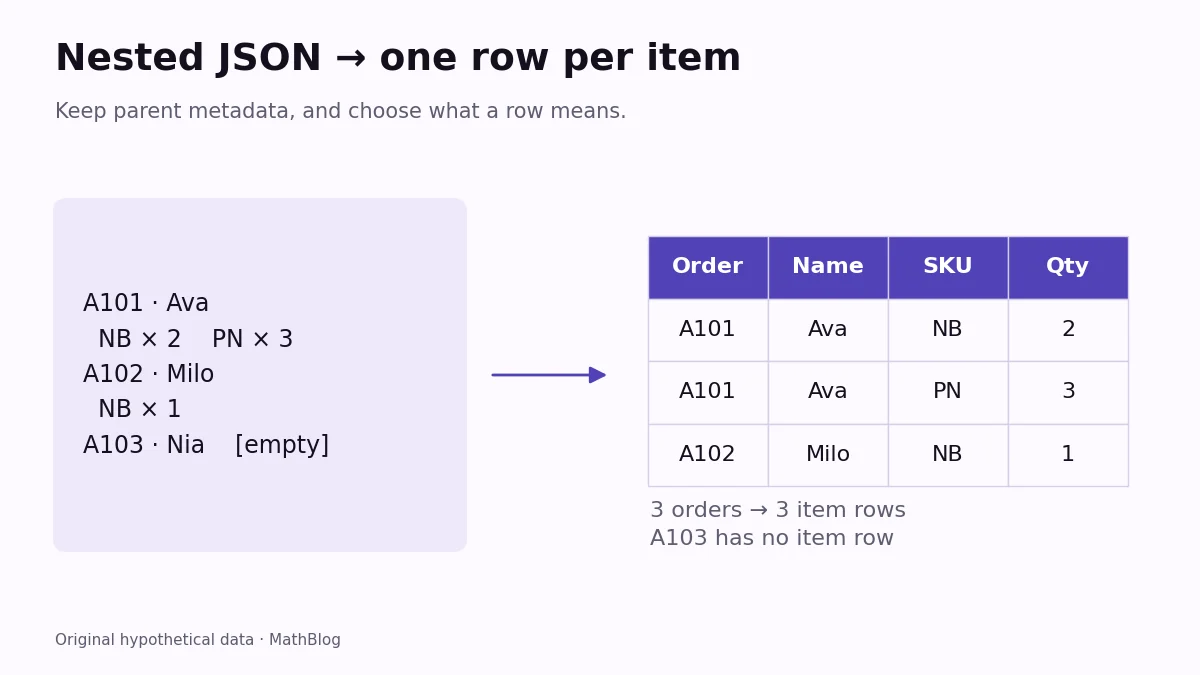
This example starts with three hypothetical orders from a small store. One order contains two items, one contains a single item, and one contains none. We will build an orders table and an item table without losing track of which customer placed each order.
Start with a small nested JSON example
Run these blocks in order in a Python session with pandas installed. No file or API account is needed. The example is a JSON string, so json.loads() first decodes it into ordinary Python lists and dictionaries. A value returned by an API client’s JSON decoder would already be decoded; it would not need that extra step.
Prices are stored as integer cents. That keeps the simple money calculation exact and makes the expected total easy to check independently.
import json
import pandas as pd

data = json.loads("""[
  {"order_id": "A101", "customer": {"name": "Ava"},
   "items": [{"sku": "NB", "qty": 2, "unit_price_cents": 600},
             {"sku": "PN", "qty": 3, "unit_price_cents": 200}]},
  {"order_id": "A102", "customer": {"name": "Milo"},
   "items": [{"sku": "NB", "qty": 1, "unit_price_cents": 600}]},
  {"order_id": "A103", "customer": {"name": "Nia"}, "items": []}
]""")

orders = pd.json_normalize(data, sep="_")
print(orders[["order_id", "customer_name"]].to_string(index=False))
The first result has one row per order:
order_id customer_name
    A101           Ava
    A102          Milo
    A103           Nia
The nested customer object has become a column called customer_name. The underscore comes from sep="_". However, the items column still contains lists. Flattening a dictionary does not automatically turn every nested list into individual rows.
Create one row per item
For an item-level table, point record_path at the list we want to expand. Keep the order ID and the customer’s name as metadata so each resulting item retains its context.
lines = pd.json_normalize(
    data,
    record_path="items",
    meta=["order_id", ["customer", "name"]],
    record_prefix="item_",
    sep="_",
    errors="raise",
)
columns = ["order_id", "customer_name", "item_sku", "item_qty"]
print(lines[columns].to_string(index=False))
Expected result:
order_id customer_name item_sku  item_qty
    A101           Ava       NB         2
    A101           Ava       PN         3
    A102          Milo       NB         1
There are three item rows. A101 repeats because that order contains two items; this is an intentional change in the unit of observation. The item_ prefix distinguishes item fields from metadata fields that might otherwise have the same name.
The nested metadata path is a list inside the outer list: ["customer", "name"]. Passing two separate strings would refer to two separate top-level fields. Keep the path aligned with the actual structure rather than with the column names you hope to obtain.
Check the row count and the money
Each line’s amount is its quantity multiplied by its unit price. For A101, the notebook line contributes 1,200 cents and the pen line contributes 600 cents. A102 contributes another 600 cents. Those three amounts total 2,400 cents, or $24.00.
lines["line_cents"] = lines["item_qty"] * lines["item_unit_price_cents"]
print(lines[["order_id", "item_sku", "line_cents"]].to_string(index=False))
print("Total cents:", lines["line_cents"].sum())
print("Orders without items:", sorted(set(orders["order_id"]) - set(lines["order_id"])))
Expected result:
order_id item_sku  line_cents
    A101       NB        1200
    A101       PN         600
    A102       NB         600
Total cents: 2400
Orders without items: ['A103']
A103 has an empty item list, so it contributes no item row. Keep the separate orders table if your report must include orders with no items. An item-row count is not an order count, even when the two counts happen to match in this small example.
Avoid three common normalization mistakes
- Check missing fields before ignoring them. The default
errors="raise"helps expose missing metadata. Usingerrors="ignore"can allow absent metadata, but it does not make a missingrecord_pathvalid. An empty items list and a missing items field are different situations. - Inspect column names. A separator can create ambiguous names if the original keys already contain that separator. Choose prefixes and review the resulting columns before calculating.
- Keep repeated totals out of sums. If you carry an order-level total into every item row, summing that repeated field can double-count orders. Calculate from the line items or summarize the orders table separately.
Once the columns and row meaning are correct, test the same checks on a small sample of your real JSON. For related workflows with tables and exports, explore our Python tutorials. The blocks above were executed with Python 3.11.3 and pandas 2.3.3.