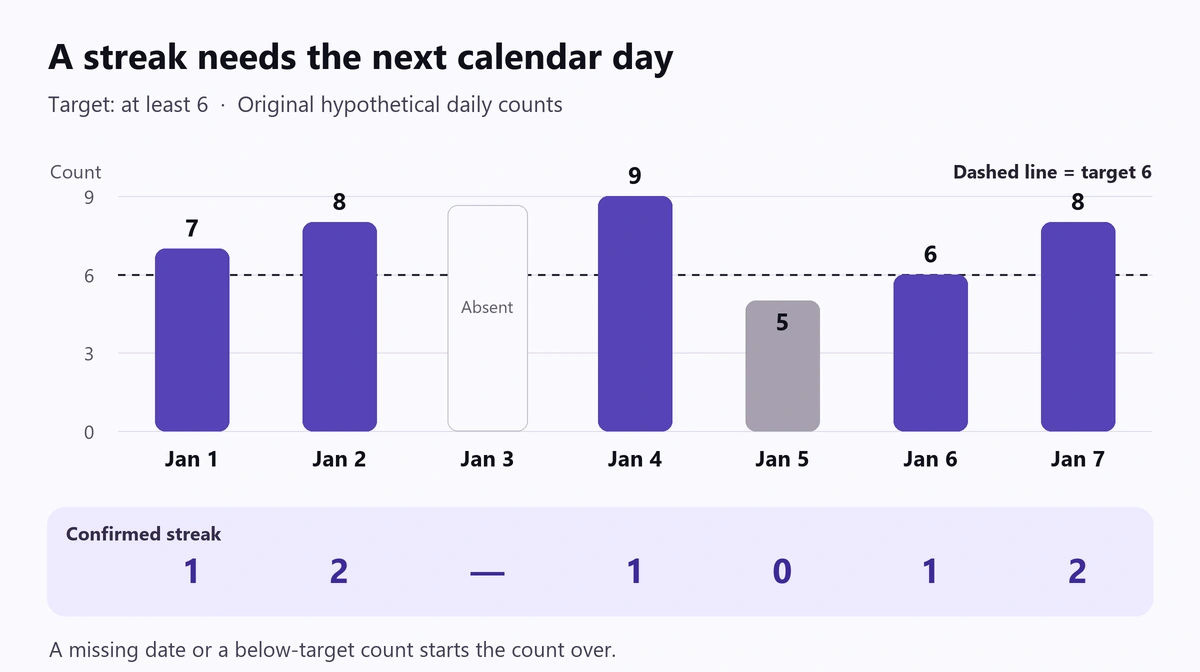
A streak continues only when the next calendar day also meets the target. In the example below, January 1 and 2 form a two-day streak. January 4 starts again at one because January 3 has no record.
This pandas workflow counts the current streak on each recorded date. It resets after a gap or a below-target day. The original hypothetical counts are 7, 8, 9, 5, 6, and 8, with a target of at least 6.
Start with one summary per date
The input is a daily summary for one activity. Dates use YYYY-MM-DD strings, with no times or time zones. A count of 6 qualifies because the comparison includes the target.
| date | count |
|---|---|
| 2026-01-01 | 7 |
| 2026-01-02 | 8 |
| 2026-01-04 | 9 |
| 2026-01-05 | 5 |
| 2026-01-06 | 6 |
| 2026-01-07 | 8 |
Run the complete example in a Python environment with pandas installed. It was tested with Python 3.11.3 and pandas 2.3.3, and the current pandas documentation was reviewed.
Check the dates, then count each run
The function sorts the dates before comparing neighbors. It rejects repeated daily summaries so two entries for one date cannot accidentally extend the streak. Missing counts break the confirmed streak and remain missing in the count column.
from math import isfinite
import pandas as pd


def target_streak(source, target=6):
    if not isfinite(target):
        raise ValueError("The target must be finite.")

    daily = source.copy()
    dates = daily["date"].astype("string")
    if dates.isna().any() or not dates.str.fullmatch(r"[0-9]{4}-[0-9]{2}-[0-9]{2}").all():
        raise ValueError("Use one YYYY-MM-DD date per row.")
    daily["date"] = pd.to_datetime(dates, format="%Y-%m-%d", errors="raise")
    if daily["date"].duplicated().any():
        raise ValueError("Resolve repeated daily summaries first.")

    daily["count"] = pd.to_numeric(daily["count"], errors="raise")
    known = daily["count"].dropna()
    if not known.map(isfinite).all() or known.lt(0).any():
        raise ValueError("Recorded counts must be finite and nonnegative.")
    daily = daily.sort_values("date").reset_index(drop=True)

    meets_target = daily["count"].ge(target).fillna(False)
    next_day = daily["date"].diff().eq(pd.Timedelta(days=1))
    continues = meets_target & meets_target.shift(fill_value=False) & next_day
    run = (~continues).cumsum()
    daily["streak"] = meets_target.groupby(run).cumsum().astype("int64")
    return daily


source = pd.DataFrame({
    "date": ["2026-01-01", "2026-01-02", "2026-01-04",
             "2026-01-05", "2026-01-06", "2026-01-07"],
    "count": [7, 8, 9, 5, 6, 8],
})
result = target_streak(source, target=6)
print(result.to_string(index=False))
The result is:
      date  count  streak
2026-01-01      7       1
2026-01-02      8       2
2026-01-04      9       1
2026-01-05      5       0
2026-01-06      6       1
2026-01-07      8       2
Read the three conditions for continuing
meets_target marks counts of at least 6. shift(fill_value=False) puts the previous row’s qualifying status alongside the current row. The first row gets False because it has no predecessor.
next_day checks whether the dates are exactly one calendar day apart. January 4 follows January 2 in the table, but the two-day gap breaks the streak. A qualifying row after that gap begins at one.
continues is True only when the current and previous counts qualify and the dates are adjacent. Each False starts a new group through (~continues).cumsum(). Within each group, the cumulative sum of the qualifying flags gives 1, 2, 3, and so on. A below-target row contributes zero.
Handle gaps and unknown counts deliberately
January 5 is recorded and below target, so its streak is zero. January 3 is absent. The code keeps that date absent while preventing the next observed date from continuing an earlier streak. If a recorded count is missing, it also gets a streak of zero here, meaning no qualifying streak can be confirmed through that date.
To display every date, see how to expose missing dates with pandas.reindex. Keep unknown counts missing unless another record establishes what happened on those dates.
Resolve repeated summaries according to what they represent. Individual event rows may need to be counted or summed into daily totals. Competing daily reports need reconciliation. For several stores or activities, calculate a separate streak for each group.
This example uses calendar days, including weekends. A business-day streak needs its own calendar rule. If your input has timestamps, first choose the reporting time zone and summarize events by local date.