TEXTJOIN combines text from several cells and places a chosen separator between the pieces. In Google Sheets, its empty-cell option is particularly useful when one record has a middle name or address line and another does not.
We will combine three fictional name fields without changing their source columns. The goal is a readable display label, not an assumption about how every person’s name should be structured or how a name can later be split apart.
Keep the original fields separate
Copy this tab-separated block into A1 on a blank worksheet:
| Row | A | B | C |
|---|---|---|---|
| 1 | First | Middle | Last |
| 2 | Ava | Chen | |
| 3 | Milo | R. | Ortiz |
| 4 | Nia | Patel |
Copy only the tab-separated block below. Worksheet letters and row numbers in the preview are display labels, not part of the data.
First	Middle	Last
Ava		Chen
Milo	R.	Ortiz
Nia		Patel
The first names are in A2:A4, optional middle fields in B2:B4, and last fields in C2:C4. B2 and B4 should be genuinely empty. The adjacent tabs in the copyable block preserve those positions.
Type Display name in D1. Keeping the combined label in D lets you change the presentation without overwriting information supplied in the original fields. These examples use English formulas and commas as argument separators.
Join a row with a space between fields
Enter this in D2:
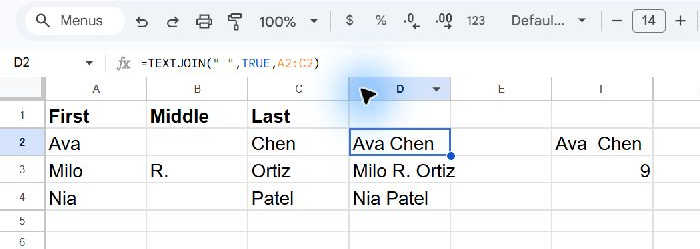
=TEXTJOIN(" ",TRUE,A2:C2)The expected result is Ava Chen. The first argument, a quoted space, supplies the separator. TRUE tells TEXTJOIN to skip empty cells, and A2:C2 supplies the three fields from the same record.
Copy D2 down through D4. You should obtain Milo R. Ortiz and Nia Patel in the next two rows. The middle field is included when it exists, and its period remains part of the original text.
See why the empty-cell option matters
In F2, enter the same operation with FALSE:
=TEXTJOIN(" ",FALSE,A2:C2)This produces Ava Chen, with two spaces between the words. The empty middle position is retained in the sequence, so there is a separator on each side of it.
Enter =LEN(F2) in F3. The result is 9, compared with eight characters in Ava Chen. A length check is useful because a double space can be difficult to see in a wide cell.
Pick a separator for the destination
A space works for this display name. For another field, a comma and space, a dash, or no separator might be appropriate. The delimiter belongs inside quotation marks; it is ordinary output text, not a cell reference.
For example, replacing the first argument with " / " would create Ava / Chen. Choose a delimiter that makes the output readable and does not pretend to be a reliable data-exchange format when the component fields can contain that same character.
A combined name is not necessarily reversible. A person can have a space in any component of a name, so splitting the finished label on spaces may not recover the original fields. Preserve the separate columns if later work needs their meaning.
Distinguish an empty cell from a space
A cell containing a space is not the same as an empty cell. If an imported optional field looks blank but still contributes unwanted spacing, inspect its content before assuming the empty-cell setting failed.
Do not automatically remove internal spaces from real names or address components. When a cleanup rule is justified, apply it in a helper column and review the result. Formatting a label should not silently change the underlying record.
Check row boundaries and updates
Each formula here joins one row. Using A2:C4 instead would combine several people into one string, which is a different task. After copying the formula, click a later result and confirm that it references that person’s source row.
The joined label is a formula result, so editing a source field updates it. If you later paste the label as a static value elsewhere, that static copy no longer follows the source. Keep that distinction clear when sending a report or preparing a separate mailing list.
Before using the method on a larger table, test a complete record, a missing optional field, and a field containing intentional punctuation or spaces. All three should remain understandable in the combined display.