To show each order’s share of its region’s unit sales, put the regional total beside every order with groupby().transform("sum"). Divide the units on each row by its region’s total and multiply by 100.
The example keeps seven orders in their original order. One North order has zero units and a 0% share. Two Trial orders also have zero units, but their shares are undefined because the whole Trial group sold zero units.
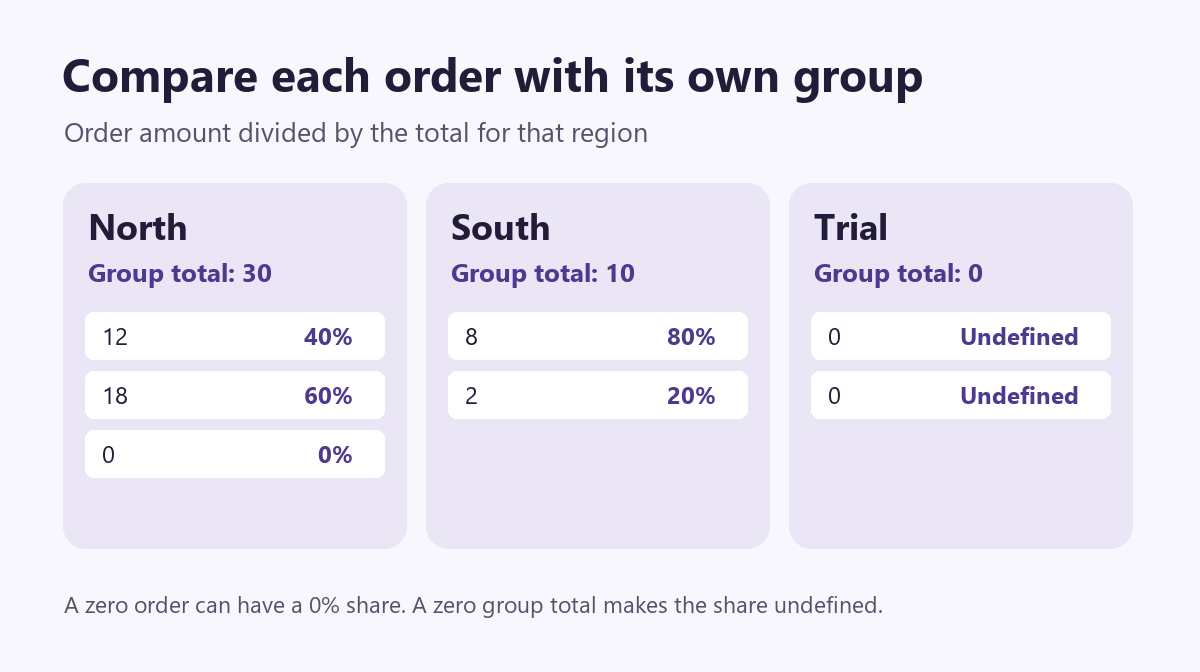
Put the group total on every row
In this fictional dataset, North orders appear on three separate rows. Trial is the reporting label for two test orders. North has 30 units in total, so each of its three orders gets 30 in the region_total column. The South orders get 10. You can still see the order ID and units for every row.
A plain groupby("region")["units"].sum() gives one subtotal per region. Use that for a regional summary. transform("sum") instead returns a Series aligned with the original rows, so you can assign the totals directly to the order table.
Run the example
Copy this block into a Python session with pandas installed. The data is included in the code.
import pandas as pd

orders = pd.DataFrame(
    [
        ("N101", "North", 12),
        ("S201", "South", 8),
        ("N102", "North", 18),
        ("T301", "Trial", 0),
        ("S202", "South", 2),
        ("N103", "North", 0),
        ("T302", "Trial", 0),
    ],
    columns=["order_id", "region", "units"],
)

region_totals = orders.groupby("region")["units"].transform(
    "sum", min_count=1
)
orders["region_total"] = region_totals
denominator = region_totals.where(region_totals.ne(0))
orders["share_pct"] = orders["units"].div(denominator).mul(100)

print(orders.to_string(index=False, na_rep="undefined"))
where keeps nonzero denominators and replaces zeros with a missing value before division. The share_pct column stays numeric. The print statement displays its missing values as undefined.
| Order ID | Region | Units | Region total | Share |
|---|---|---|---|---|
| N101 | North | 12 | 30 | 40% |
| S201 | South | 8 | 10 | 80% |
| N102 | North | 18 | 30 | 60% |
| T301 | Trial | 0 | 0 | Undefined |
| S202 | South | 2 | 10 | 20% |
| N103 | North | 0 | 30 | 0% |
| T302 | Trial | 0 | 0 | Undefined |
Check the denominator before using the shares
Order N101 accounts for 12 of North’s 30 units, or 40%. Order S201 uses South’s total, so its 8 units account for 80%. North’s three shares add to 100% and South’s two shares do too. If you round shares for display, check the unrounded values first.
Calculate the totals from the rows that belong in the report. If you want each order’s share of a full month, compute the monthly totals before filtering the display to a single week. If the report is about that week alone, filter first. Likewise, to calculate a share within each region and month, group by both columns.
Check missing units before you use a subtotal as the denominator. The min_count=1 argument leaves a group total missing when all its unit values are missing. If only some orders have units recorded, the total uses the values present. Review those rows before presenting the result as a complete share of regional sales.
Check what one row represents before using the result. If an order has several line items, the calculation gives each line’s share. Sum the lines by region and order ID first if you need one share per order.
With the default dropna=True, an order without a region stays in the original table but gets no region total. Use dropna=False if your report treats all missing region labels as one group. For help reviewing gaps in the input, see how to find and fill missing values in pandas.
Further reading
- pandas documentationGroupBy transformationsSee how a group result is aligned with the original table.
- pandas 2.3.3 documentationSum a group with a minimum number of valuesCheck how min_count affects totals for groups with missing measurements.
- pandas documentationReplace values conditionally with Series.whereSee how where fills the positions where the condition is false.
- pandas documentationChoose the grouping columns and handle missing labelsReview grouping by more than one column and the dropna option.