VALUE converts a text representation that Google Sheets recognizes as a number into a numeric value. It can fix an imported amount that looks correct on screen but does not behave like a number in a calculation.
The important step is choosing which fields should be numeric. A price can reasonably become a number; a product code with leading zeros may need to remain text. We will convert fictional amounts while visibly flagging a record that cannot be parsed.
Set up amounts that really are text
Copy this tab-separated block into A1 on a blank worksheet:
| Row | A |
|---|---|
| 1 | Raw amount |
| 2 | ="12.50" |
| 3 | ="8.75" |
| 4 | ="0" |
| 5 | ="bad" |
Copy only the tab-separated block below. Worksheet letters and row numbers in the preview are display labels, not part of the data.
Raw amount
="12.50"
="8.75"
="0"
="bad"
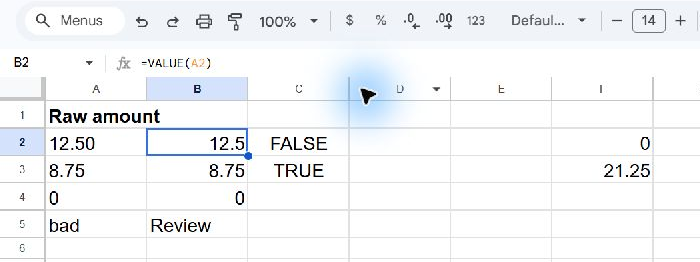
The formulas in A2:A5 intentionally return strings. This makes the example reproducible without depending on how a particular paste operation interprets numeric-looking text. A2 contains the string 12.50, not the number 12.5.
Use a United States-style locale for these dot-decimal examples. VALUE follows the formats Sheets recognizes; a different locale can change how punctuation in a number is interpreted. Keep the raw strings in A and the converted values in B.
Convert one cell and confirm its type
Enter this in B2, then copy it down through B4:
=VALUE(A2)The expected numeric results are 12.5, 8.75, and 0. A display format can show 12.50 if you want two decimal places; the displayed number of decimal places is separate from whether the cell stores text or a number.
To check the distinction, enter =ISNUMBER(A2) in C2 and =ISNUMBER(B2) in C3. The expected answers are FALSE and TRUE. Formatting A2 to look like currency would not, by itself, demonstrate that the underlying string had been converted.
Keep invalid values visible
A5 contains bad, which is not a usable amount. Enter this in B5:
=IFERROR(VALUE(A5),"Review")The result is Review. The label means someone must inspect the source record. It does not assert that the true amount is zero.
IFERROR catches any error from its first argument. Use it only after confirming that the formula and references are correct; otherwise a convenient label can conceal a broken calculation. For an initial diagnosis, try VALUE on the suspect cell without the wrapper so you can see the error.
Compare totals before and after conversion
Enter these formulas in F2 and F3, respectively:
=SUM(A2:A4)=SUM(B2:B4)The expected results are 0 for the text-only source range and 21.25 for the numeric results. The independent arithmetic is \(12.50+8.75+0=21.25\).
Neither range includes the invalid record in row 5. A sensible production check should count or list rejected records as well as calculating the accepted total. A total can be mathematically correct for the accepted rows while the full import is still incomplete.
Avoid converting every text field
VALUE can also recognize certain date and time strings and return their serial numbers. That flexibility is useful only when it agrees with the intended column type. Do not apply it indiscriminately to an export containing identifiers, dates, and measured amounts.
For identifiers such as 0042, the zeros may be meaningful. Turning that string into a number changes its representation to 42. Keep a separate rule for codes rather than treating every sequence of digits as a quantity.
Check the import before scaling up
Test a positive decimal, a genuine zero, a malformed value, and a locale-sensitive value. Preserve the source strings, confirm numeric types, and reconcile the number of accepted and rejected rows.
When a long column still fails, inspect currency symbols, grouping separators, and unusual spaces in the raw export. Change only the characters your data contract permits; stripping punctuation blindly can change a legitimate value rather than repair it.
Further reading
- Google Docs Editors HelpVALUEOfficial documentation for the function or spreadsheet setting used in this tutorial.
- Google Docs Editors HelpSUMOfficial documentation for the function or spreadsheet setting used in this tutorial.
- Google Docs Editors HelpIF functionOfficial documentation for the function or spreadsheet setting used in this tutorial.
- MathBlogGoogle Sheets tutorialsMore practical guides to cleaning, combining, and understanding your data.