Use NETWORKDAYS to count working dates between a start date and an end date. It excludes Saturdays and Sundays, and you can supply a holiday list for additional dates that should not count.
The important detail is that working endpoints count. A Monday-to-Friday interval contains five working days, even though subtracting the dates gives four. We will build an explicit calendar example so the result is easy to verify.
1. Enter real dates and a holiday list
In a blank worksheet, paste this tab-separated block into A1:
Label	Date
Start	=DATE(2026,11,2)
End	=DATE(2026,11,13)
Next, paste the following into E1. These are hypothetical company closure dates for this example, not a statement about any country’s official holiday calendar.
Closures
=DATE(2026,11,5)
=DATE(2026,11,11)
Format B2:B3 and E2:E3 as dates. DATE creates unambiguous date values using year, month, and day. Typing a string such as 11/2/2026 can mean a different date under another region’s settings.
2. Count weekdays before excluding closures
In B5, enter:
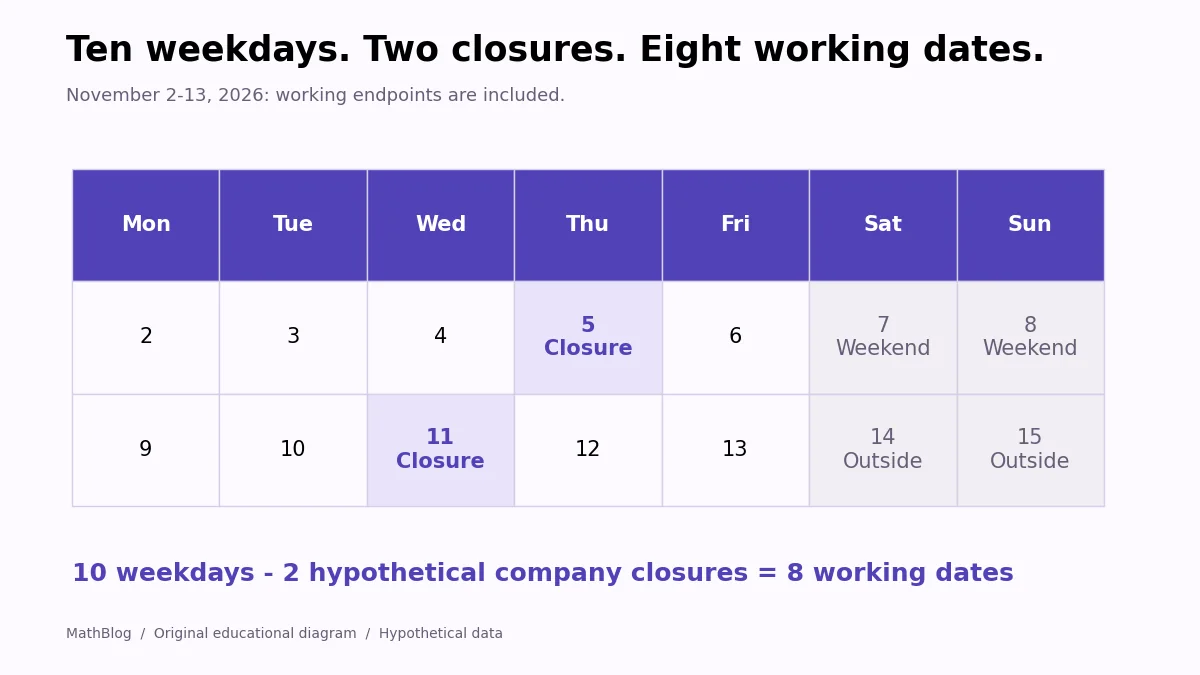
=NETWORKDAYS(B2,B3)The result is 10. November 2, 2026, is a Monday, and November 13 is the following week’s Friday. Each of the two Monday-to-Friday blocks contributes five working dates.
Both November 2 and November 13 count because they are weekdays. Saturday November 7 and Sunday November 8 do not. This formula counts whole eligible dates; it does not measure hours worked or a fractional day.
3. Exclude the listed closures
In B6, enter:
=NETWORKDAYS(B2,B3,$E$2:$E$3)Now the result is 8. The formula removes November 5 and November 11 from the ten weekdays. The dollar signs keep the holiday range fixed if you copy the calculation for another project.
| Week | Weekdays before closures | Closures in the example | Working dates |
|---|---|---|---|
| Nov 2-6 | 5 | Nov 5 | 4 |
| Nov 9-13 | 5 | Nov 11 | 4 |
| Total | 10 | 2 weekday closures | 8 |
Excel does not obtain your organization’s holidays automatically. Keep that list current, use actual date values, and choose the list that applies to the people or location being measured. A closure outside the interval does not reduce this result.
4. Decide whether the start date should count
If your rule means “working days after the start date, through the end date,” shift the first argument forward by one calendar date:
=NETWORKDAYS(B2+1,B3,$E$2:$E$3)For this example, that returns 7, because Monday November 2 no longer counts. Express the rule in words before changing the formula: elapsed working dates, leave days, and inclusive project dates can require different endpoint conventions.
Use that shifted version when the end date is later than the start date. If the dates are equal, there are zero working days after the start and through the end; handle that case before using the shifted formula, which would reverse the date order.
With the original, inclusive NETWORKDAYS formula, an equal start and end date on a working Monday counts as one; a Saturday counts as zero. These small boundary cases are useful checks when your report is off by one.
Use NETWORKDAYS.INTL for a different weekend
If your regular days off are Friday and Saturday, standard NETWORKDAYS uses the wrong working calendar. Use an explicit weekend pattern instead:
=NETWORKDAYS.INTL(B2,B3,"0000110",$E$2:$E$3)The seven-character pattern runs from Monday to Sunday. A 1 marks a weekend day, so this pattern excludes Friday and Saturday. It returns 7 for our dates and closures. The result differs because this particular interval begins on Monday and ends on Friday; it is not two complete seven-day weeks.
Check dates before using the result
- Verify the date type.
=ISNUMBER(B2)should return TRUE for the example’s stored date. - Check the year. A holiday entered for another year will not exclude the intended date.
- Check date order. Make sure the start and end cells match the question rather than assuming a negative result is a formatting problem.
- Keep the units clear. Eight working dates is not automatically 64 staffed hours; shifts, part-time schedules, and partial days need separate information.
- Match local formula separators. These examples use English function names and commas; some Excel installations use semicolons.
For other ways to work with dates and records, explore MathBlog’s Excel tutorial collection.