Use pandas.merge_asof() with a backward search to attach the latest record from the same group at or before each event. Add a time tolerance when a record becomes too old to be useful.
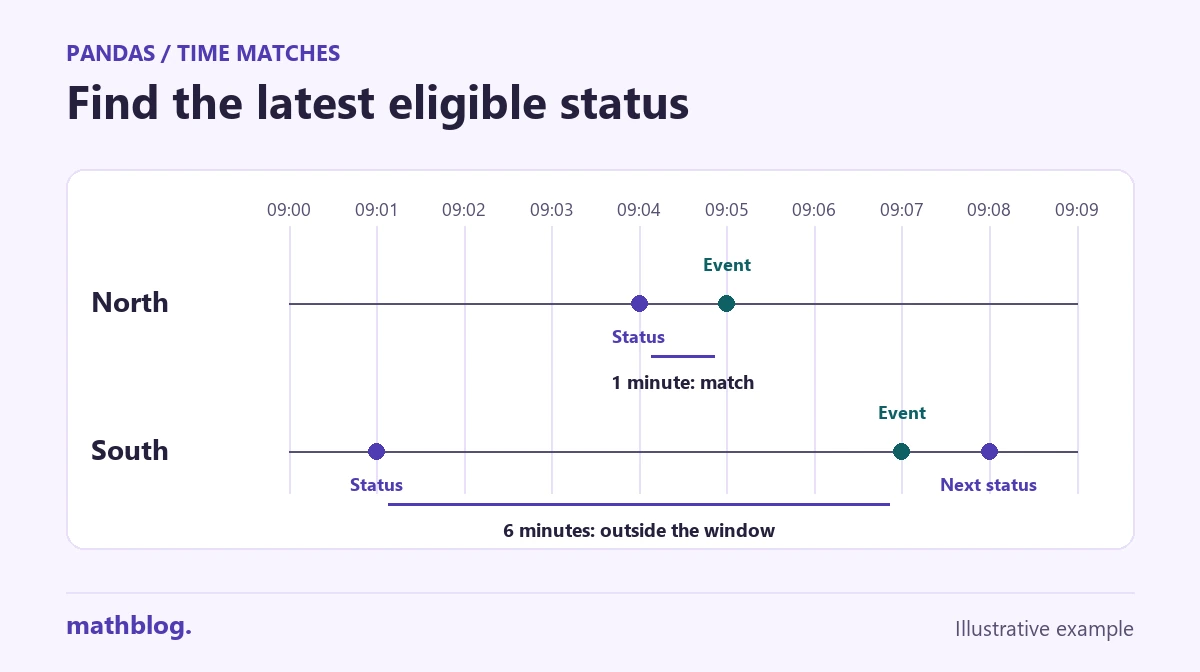
Suppose two monitoring stations write status updates and events to separate logs. The files share a station name but rarely share the same time. For this fictional example, we will use the last status known at each event, allowing a match up to five minutes old.
1. Load and check both logs
Run the code blocks in order in one Python session. The CSV strings contain all the input, so you can copy the example without setting up separate files. This example was tested with Python 3.11.3 and pandas 2.3.3.
from io import StringIO

import pandas as pd

event_csv = """event,station,event_time
E03,North,2026-10-20T09:05:00Z
E01,North,2026-10-20T09:00:00Z
E05,North,2026-10-20T09:11:00Z
E02,South,2026-10-20T09:03:00Z
E06,South,2026-10-20T09:13:00Z
E04,South,2026-10-20T09:07:00Z"""

status_csv = """station,status_time,status
North,2026-10-20T09:04:00Z,checking
South,2026-10-20T09:08:00Z,active
North,2026-10-20T09:00:00Z,ready
North,2026-10-20T09:12:00Z,ready
South,2026-10-20T09:01:00Z,standby"""

events = pd.read_csv(StringIO(event_csv), dtype={"station": "string"})
history = pd.read_csv(StringIO(status_csv), dtype={"station": "string"})

events["event_time"] = pd.to_datetime(events["event_time"], utc=True)
history["status_time"] = pd.to_datetime(history["status_time"], utc=True)

for frame, time_column in [(events, "event_time"), (history, "status_time")]:
    if frame[["station", time_column]].isna().any().any():
        raise ValueError("Every row needs a station and a timestamp.")

if history.duplicated(["station", "status_time"]).any():
    raise ValueError("Resolve status updates with identical station and time.")
The Z at the end of each timestamp means UTC. With utc=True, pandas converts offset-aware values to UTC. It also treats values without an offset as UTC, so establish the source time zone first if your inputs are local clock times.
The duplicate check makes the choice of status unambiguous. If two updates from the same station share one timestamp, use a documented sequence or other authoritative rule to choose between them. If two events have the same time, both can stay in the event log.
2. Sort by time and match within each station
events["input_order"] = range(len(events))
events_by_time = events.sort_values("event_time", kind="stable")
history_by_time = history.sort_values("status_time", kind="stable")

options = {
    "left_on": "event_time",
    "right_on": "status_time",
    "by": "station",
    "tolerance": pd.Timedelta(minutes=5),
}

matched = pd.merge_asof(
    events_by_time,
    history_by_time,
    direction="backward",
    **options,
).sort_values("input_order")

matched["age_minutes"] = (
    matched["event_time"] - matched["status_time"]
).dt.total_seconds() / 60

report = matched[[
    "event", "station", "event_time", "status_time", "status", "age_minutes"
]].copy()
report["event_time"] = report["event_time"].dt.strftime("%H:%M")
report["status_time"] = report["status_time"].dt.strftime("%H:%M").fillna("-")
report["status"] = report["status"].fillna("No match")
report["age_minutes"] = report["age_minutes"].map(
    lambda value: "-" if pd.isna(value) else f"{value:g}"
)
print(report.to_string(index=False))
Sort each whole table by its time key. A sort that puts the station first can send the timestamps backward at a station boundary and cause the merge to fail. The by="station" argument restricts which updates may match, even when records from different stations are interleaved.
Separate names for the left and right time keys keep both timestamps in the result. That lets you calculate how old the chosen record was. The saved row numbers restore the event log’s original order after the merge.
3. Read the matches and the gaps
| Event | Station | Event time | Status time | Status | Age (minutes) |
|---|---|---|---|---|---|
| E03 | North | 09:05 | 09:04 | checking | 1 |
| E01 | North | 09:00 | 09:00 | ready | 0 |
| E05 | North | 09:11 | — | No match | — |
| E02 | South | 09:03 | 09:01 | standby | 2 |
| E06 | South | 09:13 | 09:08 | active | 5 |
| E04 | South | 09:07 | — | No match | — |
E04 has no match. South’s 09:01 update is six minutes old and its 09:08 update comes after the event. North’s 09:04 update belongs to a different station. The five-minute limit includes the boundary, so E06 can use South’s update from 09:08.
Every event stays in matched. Inspect unmatched rows with matched[matched["status_time"].isna()]. The displayed “No match” label describes missing evidence within your chosen window. The station’s actual status at that moment remains unknown.
4. Choose how to handle exact times and future records
By default, a backward search accepts an exact time match, which is why E01 gets North’s 09:00 status. If the timestamp must be strictly earlier, pass allow_exact_matches=False. E01 then has no match because North has no earlier status in the log.
strict = pd.merge_asof(
    events_by_time, history_by_time,
    direction="backward", allow_exact_matches=False, **options,
)
nearest = pd.merge_asof(
    events_by_time, history_by_time, direction="nearest", **options,
)

print(strict.loc[strict["event"].eq("E01"), "status_time"].iloc[0])
print(nearest.loc[nearest["event"].eq("E04"), "status_time"].iloc[0])
The first line prints NaT, pandas’ missing timestamp marker. The second prints 2026-10-20 09:08:00+00:00. A nearest search can pick a later record, so use it when closeness in either direction is what you need. To reconstruct what was actually known at the time, use the timestamp when the status became available if it differs from the timestamp when it was measured.
For joins on exact identifiers, see how to match two lists in pandas.