Order 001 was Ready in yesterday’s export and is Shipped today. Order 002 now shows zero units where yesterday’s report had no number. The new file also has a different row order, so comparing the first row of each export would pair the wrong orders.
Put each report’s order IDs in its index, then use DataFrame.compare() on the IDs they share. Check the IDs that appear in only one report separately. That gives you the before-and-after values as well as the orders to investigate.
Start with a key that identifies one record
These fictional exports have one row per order. Keep IDs as text to preserve leading zeros. A missing unit count means the report has no value for that order. Zero is a recorded count.
| Order ID | Status | Units |
|---|---|---|
| 001 | Ready | 3 |
| 002 | Pending | Missing |
| 003 | Hold | Missing |
| 004 | Packed | 2 |
| 005 | Closed | 1 |
| Order ID | Status | Units |
|---|---|---|
| 004 | Packed | Missing |
| 001 | Shipped | 3 |
| 006 | New | 5 |
| 003 | Hold | Missing |
| 002 | Pending | 0 |
Align the reports and compare matching orders
Run this example with pandas installed. The code checks for missing, blank, padded, and duplicate IDs before pairing any rows. It uses a nullable integer column so a missing count can stay missing.
import pandas as pd

def snapshot(records):
    report = pd.DataFrame(records, columns=["order_id", "status", "units"])
    report = report.astype({"order_id": "string", "status": "string", "units": "Int64"})
    ids = report["order_id"]
    if ids.isna().any() or ids.str.strip().eq("").any():
        raise ValueError("Every order needs an ID.")
    if ids.ne(ids.str.strip()).any():
        raise ValueError("Review spaces around order IDs.")
    report = report.set_index("order_id")
    if not report.index.is_unique:
        raise ValueError("Order IDs must be unique within each report.")
    return report

earlier = snapshot([
    ("001", "Ready", 3),
    ("002", "Pending", None),
    ("003", "Hold", None),
    ("004", "Packed", 2),
    ("005", "Closed", 1),
])
later = snapshot([
    ("004", "Packed", None),
    ("001", "Shipped", 3),
    ("006", "New", 5),
    ("003", "Hold", None),
    ("002", "Pending", 0),
])

shared = earlier.index.intersection(later.index)
added = later.index.difference(earlier.index)
removed = earlier.index.difference(later.index)
fields = ["status", "units"]
before = earlier.loc[shared, fields]
after = later.loc[shared, fields]

changes = before.compare(
    after, keep_equal=True, result_names=("earlier", "later")
)
changes.columns = [f"{field}_{version}" for field, version in changes.columns]

print("Added:", ", ".join(added))
print("Removed:", ", ".join(removed))
print(changes.astype("string").fillna("Missing").to_string())
Expected output:
Added: 006
Removed: 005
         status_earlier status_later units_earlier units_later
order_id
001               Ready      Shipped             3           3
002             Pending      Pending       Missing           0
004              Packed       Packed             2     Missing
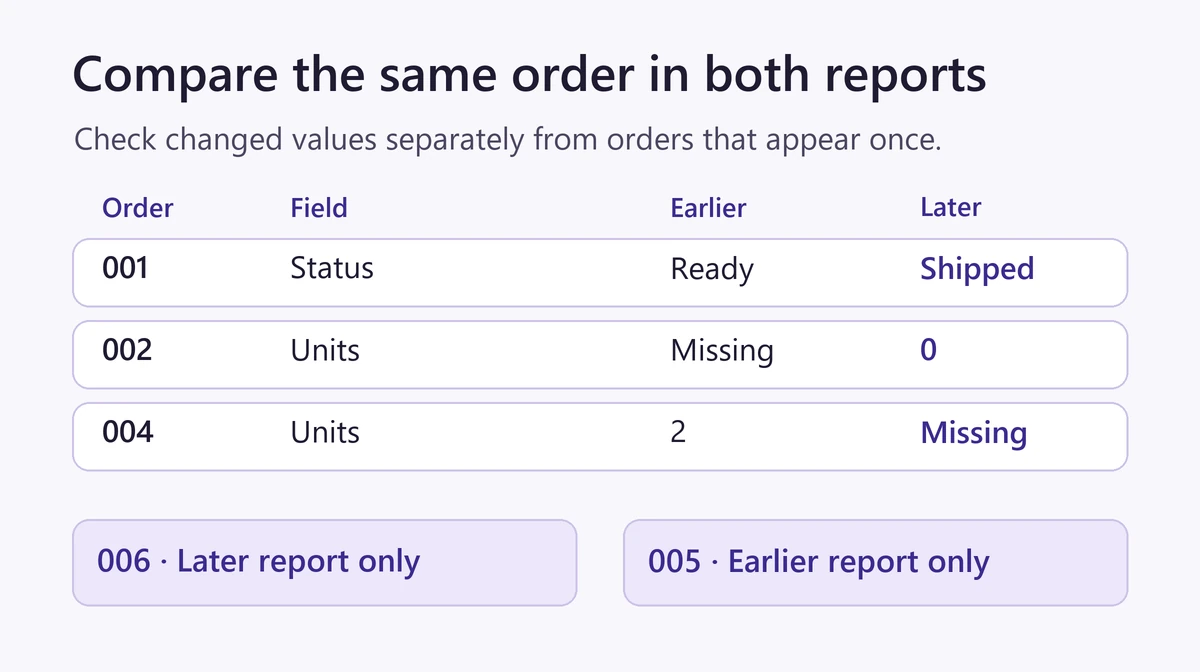
Order 001 changed status. Order 002 changed from a missing unit count to a recorded zero, and order 004 changed from two units to a missing count. Order 003 stays out of the comparison because its status and missing count agree in both reports.
Read the changes in context
compare() requires the same row and column labels in the same order on both sides. Selecting the same shared IDs and fields from both reports handles different input row orders. With keep_equal=True, you can still see that order 001 stayed at three units. The output keeps a field if it changed in at least one matched order.
Missing is a display label added after comparison. It stands for an absent source value. Use the original tables if you need to count or calculate with the units. The report also lists orders 006 and 005 separately. Those IDs are present in only one export, so there are no paired cells to compare.
Before treating an absent ID as a deletion, check that both exports cover the same dates, filters, and part of the business. If an export has several line items per order, compare by a key that includes the line identifier. See MathBlog’s guide to matching two lists in pandas for a workflow that attaches lookup fields and flags unmatched IDs.
The example was run with Python 3.11.3 and pandas 2.3.3.