To find values missing from a second list in Google Sheets, count each value in the comparison list and label the zero matches. This leaves both original lists visible and makes the comparison easy to inspect row by row.
Our example compares requested item IDs with received IDs. A repeated request stays repeated: the method flags missing request rows rather than silently removing duplicates or assuming that one receipt fulfills every quantity requested.
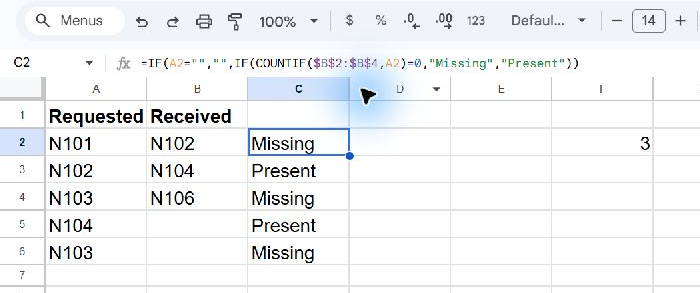
Put the two lists beside each other
Copy this tab-separated block into A1 on a blank worksheet:
| Row | A | B |
|---|---|---|
| 1 | Requested | Received |
| 2 | N101 | N102 |
| 3 | N102 | N104 |
| 4 | N103 | N106 |
| 5 | N104 | |
| 6 | N103 | |
| 7 |
Copy only the tab-separated block below. Worksheet letters and row numbers in the preview are display labels, not part of the data.
Requested	Received
N101	N102
N102	N104
N103	N106
N104
N103
Requested IDs occupy A2:A6, with an additional blank cell in A7. Received IDs occupy B2:B4. Blank positions in the tab-separated block are intentionally empty; they are not the word “blank.”
Type Status in C1. Each result in C will describe the request in the same row. The comparison range is fixed at B2:B4 so it does not shift when the formula is copied downward.
Flag each requested ID
Enter this in C2, then copy it down through C7:
=IF(A2="","",IF(COUNTIF($B$2:$B$4,A2)=0,"Missing","Present"))The outer IF leaves a blank request unlabeled. For other rows, COUNTIF counts appearances of the current ID in the received list. A count of zero produces Missing; any positive count produces Present.
| Requested ID | Expected status |
|---|---|
| N101 | Missing |
| N102 | Present |
| N103 | Missing |
| N104 | Present |
| N103 | Missing |
| (blank) | (empty result) |
The dollar signs in $B$2:$B$4 keep the comparison list fixed. The A2 reference moves to A3, A4, and so on, so each request is checked separately.
Count the missing rows
In F2, enter:
=COUNTIF(C2:C7,"Missing")The expected answer is 3. N101 is missing once, and N103 is missing on two request rows. There are only two distinct missing IDs, but this formula counts the three labeled rows.
That difference matters when your original list contains duplicates. If the report asks “How many different products are missing?”, first define a distinct-ID calculation. If it asks “How many requests remain unmatched?”, keeping the original rows may be appropriate.
Check membership rather than quantity
This approach asks whether an ID exists anywhere in the received list. Suppose N102 was requested on three rows but received once. All three requests would show Present, because each finds the same received ID.
It therefore does not reconcile quantities, match individual shipment lines, or allocate receipts to requests. Those tasks need a transaction identifier or a quantity comparison. Decide what one record means before calling a membership flag an inventory reconciliation.
Account for matching rules
COUNTIF text matching is not case sensitive. If your system treats lowercase and uppercase IDs as different, choose a case-sensitive method instead. The fictional IDs here also contain no wildcard characters. A question mark or asterisk in a real ID can be interpreted as a pattern, so literal wildcard characters need deliberate escaping.
Leading or trailing spaces can prevent a label from matching the intended value. Inspect and clean both lists consistently, while keeping the raw columns available. A cleanup rule applied to only one list can create another mismatch.
Keep the source boundaries current
If you append more received IDs, extend the fixed comparison range. If you append request rows, copy the status formula to those rows and include them in the missing-row count. A formula cannot report records outside its input range.
To validate the finished sheet, locate one known match, one known absence, the repeated N103 request, and the blank row. A correct comparison should explain all four cases without changing the original lists.
Further reading
- Google Docs Editors HelpCOUNTIFOfficial documentation for the function or spreadsheet setting used in this tutorial.
- Google Docs Editors HelpIF functionOfficial documentation for the function or spreadsheet setting used in this tutorial.
- MathBlogGoogle Sheets tutorialsMore practical guides to cleaning, combining, and understanding your data.